
Your whole backend,
built on PostgreSQL.
slonbase is an open-source backend platform on PostgreSQL: a REST and realtime API, authentication with roles, files, hooks and an admin dashboard for many projects, in one Rust binary. Every collection is a real table, and every server you add shares it.
$ curl -fsSL https://slonbase.com/install.sh | sudo sh
On Debian, Ubuntu, Fedora and RHEL. It installs PostgreSQL if needed and sets everything up. Docker and other ways
A 50-second tour of the real dashboard: a live grid, schema, rules, SQL, logs, projects and settings.
A backend in minutes.
Your data where it belongs.
Define collections in a dashboard and get a REST API, auth, realtime and files right away, with every table a real PostgreSQL table you can query, replicate and back up.
Auth and access rules
Password, OAuth2, one-time password and MFA sign-in, email flows, and per-collection API rules in one small filter language, compiled to SQL your indexes can use.
Real PostgreSQL tables
Each collection is a table in the slonbase schema. Query it with SQL, replicate it, pg_dump it, or run it on a managed service.
Realtime for every change
A trigger on each table announces every write, whoever makes it: the API, SQL, auth flows or another program. Subscribers see it, with their rules applied.
Scales out
Run several instances on one database behind any load balancer. Realtime, schema changes, settings and rate limits are shared through LISTEN/NOTIFY. No sticky sessions.
Extend it your way
JavaScript hooks for requests, records, realtime, files and mail, plus routes, cron jobs, migrations and a query builder. Or embed it as a Rust library.
Operations built in
Rate limits, sign-in lockout, request logs, scheduled backups to S3 with a history, Prometheus metrics, projects on one server, roles and API keys, and upgrades tested from the first release.
Many projects, one server
Each project is an isolated installation with its own users, collections, settings and database, on one server or several, run from a command center that shows requests, errors and latency side by side.
An SQL console and designers
Query your data in the dashboard (read-only unless you allow writes), and design your emails and your sign-in page with a live preview, with your name, colours and logo everywhere.
Roles and API keys
Owner, Admin, Developer and Viewer roles for the people who run it, and API keys with a role, an expiry and allowed IPs for scripts and CI.
A dashboard you'll enjoy.
Live grids, a schema editor, API rules, logs, an SQL console and a command center for every project. It follows your light or dark theme, takes your accent colour and your logo, and ⌘K jumps anywhere.
Make it yours.
Install it in a minute.
2.0 rebuilt Settings so that every setting does something: your name, colours, logo, sign-in page and emails, with roles for the people who run it. 2.1 and 2.2 added sign-in lockout, a rate-limit tester and a one-command install that starts from a bare server.
An installation that looks like yours
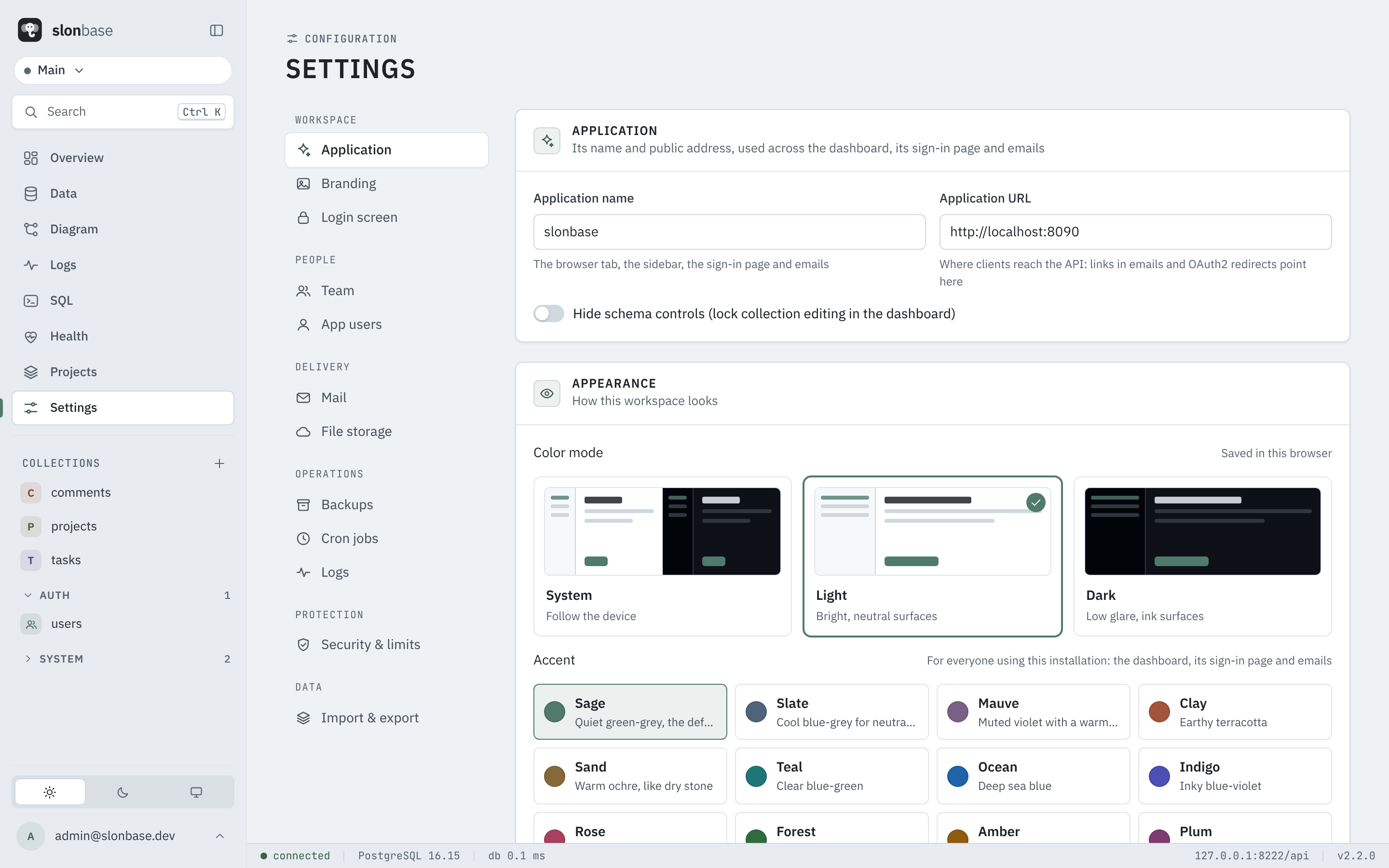
Thirteen named accents or a colour of your own, a light or dark mode, the application's name in the tab, the sidebar and the sign-in page, your logo, and a sign-in page you lay out yourself. Each project on a server has its own.
One command on Linux
install.sh installs PostgreSQL if needed, creates its role and database, installs the signed package and creates your first superuser.
Roles and API keys
Owner, Admin, Developer and Viewer decide what each superuser may change in the dashboard. API keys let scripts and CI call the API without a person's password.
An email designer with a live preview
A layout around every email, each template as HTML, and placeholders for the record and the link, with the real result shown below as you type.
<h1>Welcome to {APP_NAME}</h1>
<p>Hi {RECORD:name}, your one-time code is:</p>
<p><b>{OTP}</b></p>
See what ran, and keep it safe
A history of every backup and cron job with how it ended, encrypted backups shown as such, lockout after failed sign-ins, CORS and maintenance mode, and a tester that tells you which rate-limit rule a request would hit.
Write less backend.
Ship the app.
A typed client SDK, a filter language your rules and queries share, hooks for the logic that's yours, and SQL whenever you want it. Use the PocketBase SDKs you may already know: they work with slonbase's API.
- Filters and API rules, relation paths,
@request.*and@collection.* - Auth with passwords, OAuth2 providers, one-time passwords and MFA
- Batch requests in one transaction,
expand, files and thumbnails - Clear, field-level validation errors your forms can show as they are
import PocketBase from "pocketbase";

// the PocketBase JS SDK works with slonbase's API
const pb = new PocketBase("http://localhost:8090");

await pb.collection("users")
  .authWithPassword("ann@example.com", "secret");

const posts = await pb.collection("posts").getList(1, 20, {
  filter: 'published = true && views > 100',
  expand: "author",
});

// realtime
pb.collection("posts").subscribe("*", (e) => {
  console.log(e.action, e.record.title);
});
// hooks: your logic, next to your data
onRecordCreateRequest((e) => {
  if (!e.auth) throw new ForbiddenError("Sign in first.");
  e.record.set("author", e.auth.id);
  e.next();
}, "posts");

routerAdd("GET", "/api/top", (e) => {
  const rows = arrayOf(new DynamicModel({ title: "", views: 0 }));
  $app.db().select("title", "views").from("posts")
    .where($dbx.hashExp({ published: true }))
    .orderBy("views DESC").limit(10).all(rows);
  return e.json(200, rows);
});

cronAdd("cleanup", "0 3 * * *", () => {
  $app.db().delete("posts", $dbx.hashExp({ status: "spam" })).execute();
});
-- every collection is a real table: query it, join it, index it
SELECT a.name, count(*) AS posts, sum(p.views) AS views
FROM slonbase.posts p
JOIN slonbase.users a ON a.id = p.author
WHERE p.published
GROUP BY a.name
ORDER BY views DESC;

-- and changes made here reach realtime subscribers too
UPDATE slonbase.posts SET featured = true WHERE views > 10000;
Measured, not promised.
The same seeded data and the same workloads, on the same machine, through the same HTTP API, against PocketBase and PostgREST. Every number below is from a run you can repeat: the scripts, the raw results and the caveats are in bench/.
Binary on disk
| slonbase | 21.3 MB |
| PocketBase | 32.0 MB |
| PostgREST | 19.6 MB |
Download
| slonbase | 9.8 MB |
| PocketBase | 12.2 MB |
| PostgREST | 4.3 MB |
Memory, idle → under load
| slonbase | 40 MB → 64 MB |
| PocketBase | 41 MB → 1343 MB |
| PostgREST | 15 MB → 99 MB |
Resident memory of the server process only. slonbase and PostgREST keep their data in a PostgreSQL server, whose memory is not counted; PocketBase's SQLite runs inside its process. The PostgreSQL server is shared by every instance.
Different tools,
different trade-offs.
slonbase began with an idea from PocketBase and has grown into its own platform, built from scratch in Rust for PostgreSQL. It keeps the PocketBase SDK API, so existing apps, hooks and data carry over. PostgREST is the other thing people reach for on PostgreSQL: a very lean REST layer with nothing else attached. Read the full comparisons: slonbase and PocketBase, slonbase vs PostgREST.
| slonbase | PocketBase | PostgREST | |
|---|---|---|---|
| What it is | A whole backend: API, auth, files, realtime, hooks, dashboard | A whole backend: API, auth, files, realtime, hooks, dashboard | A REST layer over a PostgreSQL schema, nothing else attached |
| Database | PostgreSQL 14+ (yours, or managed) | SQLite, inside the process | PostgreSQL (yours, or managed) |
| Your data | Real tables: SQL, replicas, pg_dump, BI tools | A SQLite file | Real tables, which you design and migrate yourself |
| API and SDKs | Compatible with the PocketBase SDKs | The PocketBase SDKs | Its own query syntax and OpenAPI; generic HTTP clients |
| Sign-in and users | Built in: passwords, OAuth2, one-time codes, MFA, roles | Built in: passwords, OAuth2, one-time codes, MFA | Verifies JWTs; issuing them and managing users is up to you |
| Access rules | Per-collection rules in a filter language | Per-collection rules in a filter language | PostgreSQL's row-level security |
| Files | Disk or S3, thumbnails | Disk or S3, thumbnails | No |
| Realtime | Every change, including SQL and other programs | Changes made through the app | No |
| Dashboard | Yes | Yes | No |
| Extending | JavaScript hooks (PocketBase's run as they are), or Rust | JavaScript hooks, or Go | PostgreSQL functions and views |
| Instances | Any number on one database, behind any load balancer | One | Any number on one database |
| Moving parts | One binary and a PostgreSQL server | One binary | One binary and a PostgreSQL server |
Choose slonbase when
you want PocketBase's way of working on PostgreSQL: SQL access to your data, several instances, managed databases, replicas, and a bigger ceiling for lists and filters.
Choose PocketBase when
you want zero moving parts: one file, SQLite inside, nothing else to run, one small app on one small machine, or you extend it in Go.
Choose PostgREST when
you already manage your PostgreSQL schema and only need a fast REST layer in front of it, with row-level security, and you handle sign-in, files and realtime elsewhere.
From one binary
to a fleet.
Start with one instance. When you need more, add instances behind any load balancer, a pooler, or other PostgreSQL servers. Each layout below was run and tested, not just drawn.

Shared through PostgreSQL
Tokens, schema, settings, rate limits, realtime events and cron all coordinate through the database. Any load balancer works with no sticky sessions: a sign-in on one instance is valid on all, and changing a password or "sign out everywhere" ends a token on every instance at once.
Mind the connections
Each instance and each project holds PostgreSQL connections: at most N × (18 + 5 × projects). Lower the pools, raise max_connections, or put PgBouncer in front with a direct connection for LISTEN. Health warns before you run out.
Files need S3 or a shared volume
Local file storage belongs to one instance. Use S3 or one mounted directory, and stop all instances to upgrade: rolling upgrades are not supported yet. The guide says what was tested, and where the limits are.
Frequently asked.
The short answers. The full ones are in the about page, the feature list and the documentation.
What is slonbase?
slonbase is an open-source backend platform on PostgreSQL. One Rust binary gives you a REST and realtime API, authentication with roles, file storage, JavaScript hooks and an admin dashboard that manages many projects. Every collection is a real PostgreSQL table, and it is self-hosted under the Apache 2.0 license.
Is slonbase a PocketBase clone or fork?
No. slonbase is a separate codebase written from scratch in Rust for PostgreSQL, with its own dashboard and features such as many projects in one installation, roles and API keys, an SQL console and scale-out across instances. PocketBase inspired the idea, and slonbase keeps its API shape on purpose, so the PocketBase SDKs, hooks and data carry over.
Do I need to install PostgreSQL myself?
slonbase needs PostgreSQL 14 or newer, which it does not bundle. On Debian, Ubuntu, Fedora and RHEL the one-command installer installs PostgreSQL if the machine has none, creates the database and role, and sets slonbase up. You can also point it at an existing or managed PostgreSQL.
How does slonbase compare with PocketBase and PostgREST?
PocketBase is one Go binary with SQLite inside, and PostgREST is a lean REST layer over a PostgreSQL schema. slonbase is a whole backend platform on PostgreSQL. In the public benchmark on one 4-vCPU machine it served 4.9 times as many list requests per second as PocketBase and 2.1 times as many as PostgREST. Each comparison page lists what differs and when to choose which.
Is slonbase ready for production?
slonbase follows Semantic Versioning with a written stability promise, is tested against the PocketBase SDKs, is upgraded in place from every release in continuous integration, and publishes its security reviews. As with any software that holds your data, back up before upgrading and test your own workload.
How do I move from PocketBase?
Run slonbase import-pocketbase on your pb_data folder or a backup zip. It brings over collections, records with their password hashes, files and settings, and the PocketBase SDKs work against slonbase's API. The migration guide lists the few differences.
Can one slonbase host several apps?
Yes. Projects are isolated installations inside one slonbase process, each with its own users, collections, settings and database, managed from a command center in the dashboard.
Can I run several slonbase instances behind a load balancer?
Yes, with no sticky sessions: tokens, schema, settings, rate limits and realtime are shared through PostgreSQL, and a sign-in on one instance is valid on all. Plan the PostgreSQL connections (each instance and project holds some; PgBouncer in transaction mode works with a direct connection for LISTEN), keep files on S3 or a shared volume, and stop all instances to upgrade. The scaling guide lists the tested layouts and the limits.
What does it cost, and under which license?
slonbase is free and open source under the Apache 2.0 license, with no limits on users, projects or instances. You host it yourself, so your costs are your own server and PostgreSQL.
The latest release.
Security hardening: the sign-in lockout on by default, rate limits that keep their total when the database fails, security checks in Health, a restricted role for the SQL console, and tests that hold every path to the same rules.
Release notes →- Sign-in lockout on by default, and security checks in Health
- An authorization test across every path to a record
- Apache 2.0 license, a CLA and a trademark policy (2.3.1)
- PgBouncer support and a scaling guide (2.3)
- Sign out everywhere, on every instance (2.3)
- One-command install on Linux, and slonbase.com (2.2)
Install it your way.
One command on Linux, or Docker. slonbase connects to any PostgreSQL 14+ server, and the installation guide starts from a bare server.
# Debian, Ubuntu, Fedora, RHEL: installs PostgreSQL if needed, creates its role and database,
# installs slonbase and creates your first superuser
curl -fsSL https://slonbase.com/install.sh | sudo sh
mkdir slonbase && cd slonbase
curl -fsSLO https://raw.githubusercontent.com/ayeshrodz/slonbase/main/compose.yaml
echo "POSTGRES_PASSWORD=$(openssl rand -hex 24)" > .env
docker compose up -d
docker compose logs slonbase | grep "setup?token"
curl -fsSL https://slonbase.com/slonbase.gpg | sudo tee /usr/share/keyrings/slonbase.gpg > /dev/null
curl -fsSL https://slonbase.com/slonbase.list | sudo tee /etc/apt/sources.list.d/slonbase.list
sudo apt update && sudo apt install slonbase
sudo journalctl -u slonbase | grep "setup?token"
sudo curl -fsSL -o /etc/yum.repos.d/slonbase.repo https://slonbase.com/slonbase.repo
sudo dnf install slonbase
sudo journalctl -u slonbase | grep "setup?token"
curl -fsSLO https://github.com/ayeshrodz/slonbase/releases/download/v2.2.0/slonbase-2.2.0-linux-amd64.tar.gz
tar xzf slonbase-2.2.0-linux-amd64.tar.gz
./slonbase serve    # prints the setup link
# collections, records, password hashes, files and settings, from pb_data or a backup zip
slonbase setup --database-url "postgres://..." --email you@example.com --password '...'
slonbase import-pocketbase ./pb_data
cp pb_hooks/*.pb.js slonbase_hooks/   # your hooks keep working
slonbase serve
Or deploy with one click on Render, or with the setups for Fly.io and others. Packages update with apt upgrade and dnf upgrade (repository details).
The story behind slonbase
Why build a new backend for PostgreSQL from scratch, and how it's tested to behave the way apps expect. Read the story on the blog.